Game guide
Planted by a playerGnome Line guide: how to play, rules and tips
Gnome Line is a free garden railway puzzle you play in your browser on GamesGarden, on phone or laptop. You lay little railway lines between garden plots, and toy trains carry the gnomes home to the kind of plot they want. It starts calm and gets busy as the garden grows.
Play Gnome Line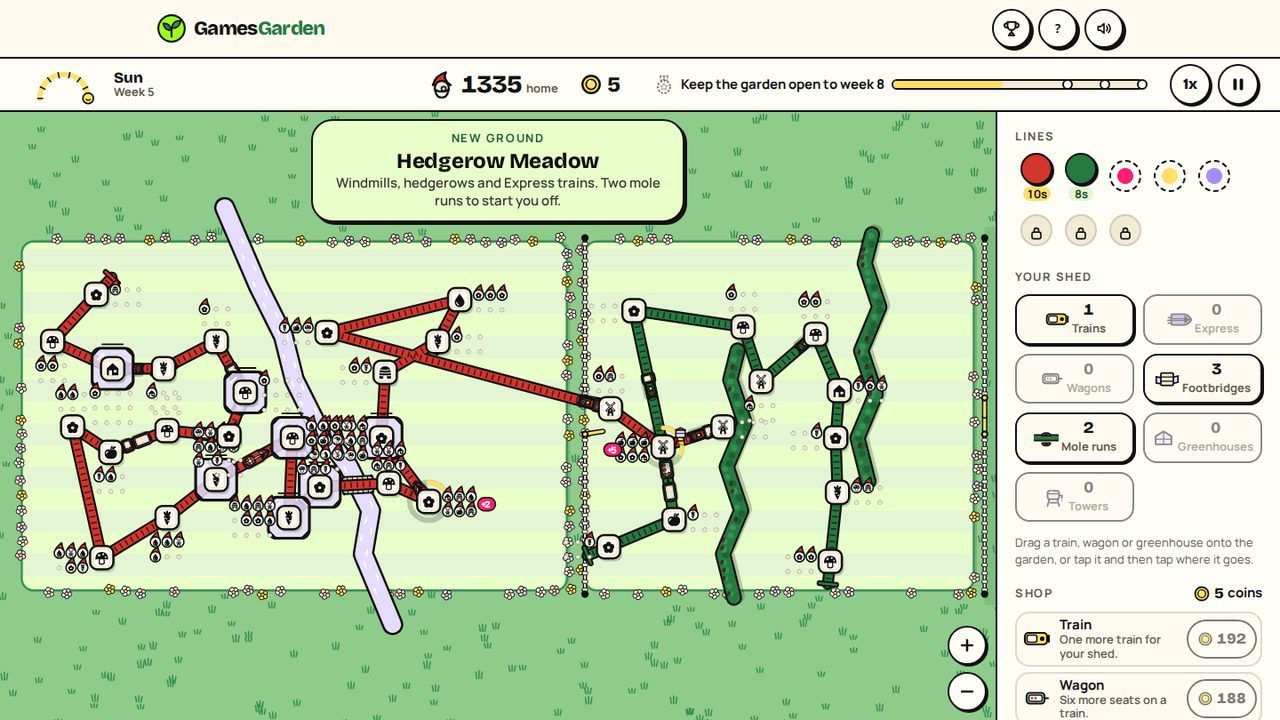
How to play
- Pick a garden and how busy it should be (Easy, Medium, Hard or Expert), then press Play. New here? Try the 2-minute lesson first.
- Drag from one plot to another to lay a line. A train comes with it and runs on its own.
- Gnomes wait on the bench by each plot. The icon on a gnome's hat shows the kind of plot it wants, such as a flower bed or a carrot patch.
- Trains carry the gnomes, and they change trains by themselves where lines meet.
- Every gnome home pays a fare. Spend coins in the shop on trains, wagons, footbridges, greenhouses, line colours and upgrades.
- Every Sunday evening the seed post brings a train and two seed packets. Pick one.
- When a plot stays crowded too long, the garden closes and the run ends. Finished runs bank tickets for the Engine Works.
Rules that matter
- Crowding: a plot's bench seats 6. Past that, a ring round the plot fills and turns pink. A full ring closes the garden.
- Gnomes only ride if it helps. A gnome boards only when the train's next stop brings it closer to its kind. If no line reaches that kind, it waits and the plot fills.
- The brook needs a footbridge per crossing, and you start with two.
- Greenhouses double a plot's seats. The Junction seats 18, and gnomes changing trains board first there.
- New ground: in week 4 the gate opens onto Hedgerow Meadow (windmills, hedgerows, mole runs, Express trains), in week 7 The Old Orchard (scarecrows, the big pond, the Junction, Big Bertha). A line passes under a hedgerow through a mole run. Nothing crosses the big pond, so go round.
- Garden days such as market day or a garden wedding are announced the day before.
Tips and strategy
- Check what a line misses. Its card lists the kinds it cannot reach and how many changes each takes. Tap one to light it up.
- Watch the rarest plots. Every kind draws about the same crowd, so a lone plot of its kind gets busy. The podium ranks them.
- Read the card's hint. "Trains full: add a wagon" means seats are short. "Long waits and free seats" means add a train or shorten the line.
- Pause to rethink. You can still change lines while paused, and time slows right down while you drag.
Modes and levels
- Levels: Easy, Medium, Hard and Expert set how busy the garden gets.
- Six gardens: The Garden, Willow Delta, Terrace Hill, The Three Isles, Moonlit Garden and Frost Garden. Keep a garden open to the end of week 8 (week 6 on Hard, week 5 on Expert) for bronze and the next garden opens. Silver and gold come a week and two later.
- Twists: trains puff uphill on Terrace Hill, ferries join The Three Isles, and in Frost Garden lines skate the frozen ponds until the thaw, when every gnome comes out and a line over a pond waits at the bank for a footbridge.
- Today's garden: the same plots for everyone today.
- The Engine Works: tickets buy upgrades that last, like Steam, Seats and Patience. Your rank, from Porter to Railway Royalty, opens more. A bronze on Medium or harder opens the medal works.
Controls
On a phone
- Drag plot to plot to lay a line. Drag an end bar onto more plots to extend, or the middle onto a plot to add a stop.
- Tap a line for its card. The scissors cut it, the x takes a plot off. To reconnect, tap the loose end, then a plot.
- Pinch to zoom, drag the lawn to look around. Turn sideways for a bigger garden.
- Drag a train, wagon or greenhouse from your shed onto the garden, or tap it, then tap where it goes.
On a laptop
- Drag with the mouse to lay and change lines, and zoom with the wheel.
- Space pauses, 1, 2 and 3 set the speed (1x is calm), Esc deselects, plus and minus zoom, Ctrl Z undoes.
Questions and answers
Is Gnome Line free?
Yes. Gnome Line is free in your browser, with no download.
Can I play Gnome Line on my phone?
Yes, Gnome Line works on phones and laptops.
Do I need an account to play Gnome Line?
No. An optional garden name (no email, no password) puts you on the leaderboards, and a 12-character garden key brings your name, points and Engine Works to another device.
How do scores count in Gnome Line?
Your score is the gnomes you bring home. A finished run is checked by the server replaying the match before it counts on the board.
What ends a run in Gnome Line?
A run ends when one plot's ring fills. Once a run you can close for repairs and rebuild from a calm garden.
Ready to play?
Gnome Line is free in your browser, with no download and no sign-up.
Play Gnome Line