Game guide
I Gnome What You Mean guide: how to play, rules and tips
I Gnome What You Mean is a word puzzle, free in your browser on GamesGarden. A garden gnome walks around a little bed of hedges and pushes letter blocks. Push one block into another and they join into one. Read the clue, work out the word it means, and build it in a single block. There is no timer and undo is free, so every level is a calm puzzle you can poke at until it clicks.
Play I Gnome What You Mean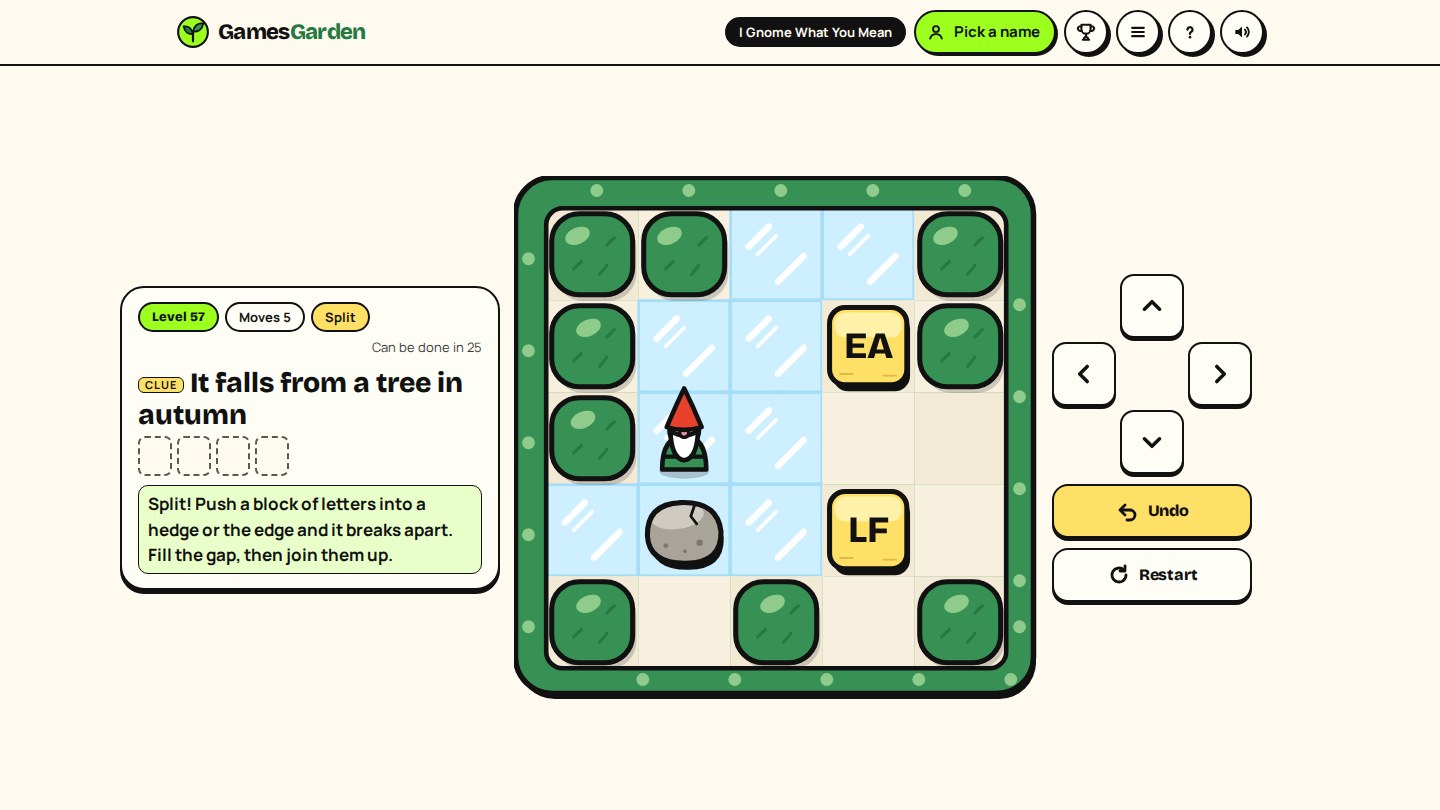
How to play
- Read the clue at the top. It never says the word, it hints at it: "Not you, but..." means ME.
- Walk the gnome one step at a time. Walk into a letter block to push it one cell. You cannot pull a block, only push it.
- Push a block into another block and they join into one block that reads both letters.
- The level is solved when the word the clue means stands as one block. Some levels have two clues: build both words, each in a block of its own.
- Solve a level and the next one opens. They grow slowly: bigger beds, longer words, and new things in the garden every few levels.
The first two levels show you the moves with a soft arrow on the controls. After that you are on your own, with a short tip the first time something new turns up.
How blocks join: ON or NO
Blocks always join in reading order, left to right and top to bottom. That is the whole trick of the game, so it is worth a minute:
- Push an O into an N from the left and you get ON. Push the same O into the N from the right and you get NO.
- Pushing up or down joins top to bottom: an N sitting on top of an O reads NO, whichever block you pushed.
- Blocks of two or more letters join the same way, so GN pushed into OME from the left makes GNOME.
- Split: push a block of letters straight into a hedge, the edge or a stone and it breaks apart. The two halves pop out to each side and a middle letter stays put (FROGS becomes FR, O and GS). Both side cells must be free, or it is just a bump. Levels marked Split need one.
- Spare letters: some levels have a block the word does not use. Park it somewhere out of the way.
Ice, stones and gaps in the hedge
- Ice: a block pushed onto ice keeps sliding until something stops it: a hedge, the edge, a stone or another block. If it slides into a block, they join. The gnome never slides, only the blocks do.
- Gaps: a gap in the hedge has a twin on the far side. Walk out of one and you come back in through the other. Blocks go through too, which opens up pushes that look impossible.
- Stones: push a stone one step at a time. It never joins letters and it never slides. To a letter block a stone is a wall, so a block stops against it, and a long block splits against it just as it would against a hedge.
Stones and ice together are where the game gets clever. Look at where a sliding block would stop, and ask whether something you can move would stop it somewhere better.
The fewest moves, stars and the leaderboard
- Every level shows how few moves it can be done in. Each step counts as a move, pushes included. Bumping into a hedge does not count.
- Solve a level in that many moves and you get a star and a little fanfare. Miss it and the solved card offers "Try it in fewer moves".
- The level picker on the title screen shows every level you have solved, with its star, and lets you go back to any of them. Levels past your furthest one stay locked.
- With a garden name, every level deeper than you have ever solved pays garden points once: 1 point for levels 1 to 30, 2 for 31 to 60, 3 for 61 to 90, 4 for 91 to 120 and 5 from level 121. Every solve is replayed on our side before it counts, and your furthest level follows your garden name to another phone or computer.
Make your own levels
Tap Make a level on the title screen to build a puzzle of your own, then share it with a simple link.
- Pick a word from our word list (its clue comes with it), or type your own: a real English word of 2 to 6 letters and a hint of up to 80 characters. Players only ever see the clue, and the level shows your garden name while they play.
- Group the letters into blocks, in any order: tap a letter to light it, tap more letters to join them on, and tap it again when done. Tap a block to break it back into letters. A block like DENGAR for GARDEN makes players split it first.
- Add spare letters if you like (up to three the word does not use) to lead players astray.
- Paint the garden: lawn, hedges and ice, on a bed of 5 by 5 up to 7 by 7. Drag a finger to paint a row. Add stones if you like, and open a gap in the hedge with the Gap tool or a tap on the hedge beside a row or column.
- Place the gnome and every block, then tap Test it and solve your own level, with undo and restart as usual.
- Publish: only a level you have solved can go up, and we replay your solve on our side, so every shared level is proven to work. Your move count becomes its "Can be done in". You need a garden name to publish (no email, no password).
Find what other players made under Player levels, sorted by Latest or Popular (the most liked). After a solve, tap the heart if you liked it, or Report a level that should not be in the garden. Next player level takes you straight to one you have not solved yet, and the list ticks off every one you have done. Player levels are just for fun: they pay no garden points, and makers see how many players solved theirs under Mine.
Tips
- Say the word out loud first. Once you know the word, the order of the letters tells you which side each push has to come from.
- Build from the middle. Join the two middle letters first, then add the ends from the left and the right.
- Mind the corners. A block pushed into a corner can never come out. Before a push, check you can still get behind the block afterwards.
- Use undo freely. Undo goes all the way back to the start, and even a restart can be undone. Trying a push to see what happens costs nothing.
- Count before you go for the star. Solve it once any way you can, then replay it with the fewest moves in mind. Walking is often where the extra moves hide.
Controls
On a phone
- Swipe on the garden to walk, and keep your finger down to keep walking.
- Or tap the arrow buttons (hold one to repeat).
- Undo and Restart sit beside the arrows.
On a laptop
- Arrow keys or W A S D to walk.
- Z or Backspace to undo, R to restart.
- Escape opens the menu, Enter goes to the next level.
Questions and answers
Is I Gnome What You Mean free?
Yes. It is free to play in your browser, on a phone or a computer, with no download.
Is there a timer?
No. Take as long as you like. Undo is free and unlimited, so there is no way to get stuck for good.
I pushed a block into a corner. What now?
Tap Undo until the block is back where you want it, or Restart the level. A restart can be undone too.
How many levels are there?
There are 200 levels so far, with more to come. The level list shows the first 100 and opens more pages once you get past level 100. Every one is checked to be solvable before you get it, and new ideas like ice, splits, gaps and stones join along the way.
Who came up with I Gnome What You Mean?
Jeep, a player, planted the idea on GamesGarden: push letter blocks together to make words, with a clue for each level and icy floors. Jeep also named it. We grew it together, round by round.
Do I need an account to play?
No. Play without signing up. Add an optional garden name (no email, no password) to put your levels on the leaderboard.
Ready to push some letters?
I Gnome What You Mean is free in your browser, with no download and no sign-up.
Play I Gnome What You Mean